Email & Notifications
Overview
Slotara sends transactional emails for booking events, account actions, and contact form submissions. All emails use Laravel's mail system via your configured SMTP provider and are dispatched through the queue for non-blocking delivery.
{primary.fa-envelope} Email content is fully customisable. See Email Templates for all templates and
{{PLACEHOLDER}}variables.
SMTP Configuration
Set your mail credentials in .env:
MAIL_MAILER=smtp
MAIL_HOST=smtp.mailgun.org
MAIL_PORT=587
[email protected]
MAIL_PASSWORD=yourpassword
MAIL_ENCRYPTION=tls
[email protected]
MAIL_FROM_NAME="Slotara"
Popular SMTP providers:
| Provider | Host | Port | Notes |
|---|---|---|---|
| Mailgun | smtp.mailgun.org |
587 |
Recommended — excellent deliverability |
| SendGrid | smtp.sendgrid.net |
587 |
Good free tier |
| Postmark | smtp.postmarkapp.com |
587 |
Optimised for transactional email |
| Amazon SES | email-smtp.us-east-1.amazonaws.com |
587 |
Cost-effective at scale |
| Gmail | smtp.gmail.com |
587 |
Development only — strict rate limits |
{warning.fa-exclamation-triangle} Do not use Gmail in production. Google applies strict rate limits and may suspend sending from accounts with unusual patterns. Use a dedicated transactional email provider like Mailgun, Postmark, or SES.
Notification Events
| Event | Who Receives It | Template Slug |
|---|---|---|
| Booking created (free service) | Client | booking_confirmation |
| Booking confirmed (after Stripe payment) | Client | booking_confirmation |
| Booking cancelled by client | Client | booking_cancellation |
| Booking cancelled by staff | Client | booking_cancellation |
| Contact form submitted | Admin (contact_email) |
contact_confirmation (to submitter) |
| Admin replies to a contact message | Client | admin_contact_reply |
| New user registered | Admin | Internal notification |
| Welcome email | New user | System template |
| Password reset completed | User | System template |
{primary.fa-bell} Admin users configure per-event, per-channel preferences from Admin → Notification Preferences. Each admin controls their own settings independently.
Queue Setup
All emails are dispatched as queued jobs so they don't block HTTP responses. A queue worker processes them in the background.
Required .env setting for production:
QUEUE_CONNECTION=databaseRun the worker manually (development):
php artisan queue:work --tries=3Run with Supervisor (production — keeps worker alive):
[program:slotara-worker]
process_name=%(program_name)s_%(process_num)02d
command=php /var/www/html/artisan queue:work database --sleep=3 --tries=3 --max-time=3600
autostart=true
autorestart=true
user=www-data
numprocs=1
redirect_stderr=true
stdout_logfile=/var/log/slotara-worker.log
Restart Supervisor after adding the config:
sudo supervisorctl reread
sudo supervisorctl update
sudo supervisorctl start slotara-worker:*
{danger.fa-ban} If you leave
QUEUE_CONNECTION=sync, emails send inline — blocking the HTTP response. This is fine for development but will cause slow page loads in production. Always usedatabase(orredis) queue in production.
Testing Email Delivery
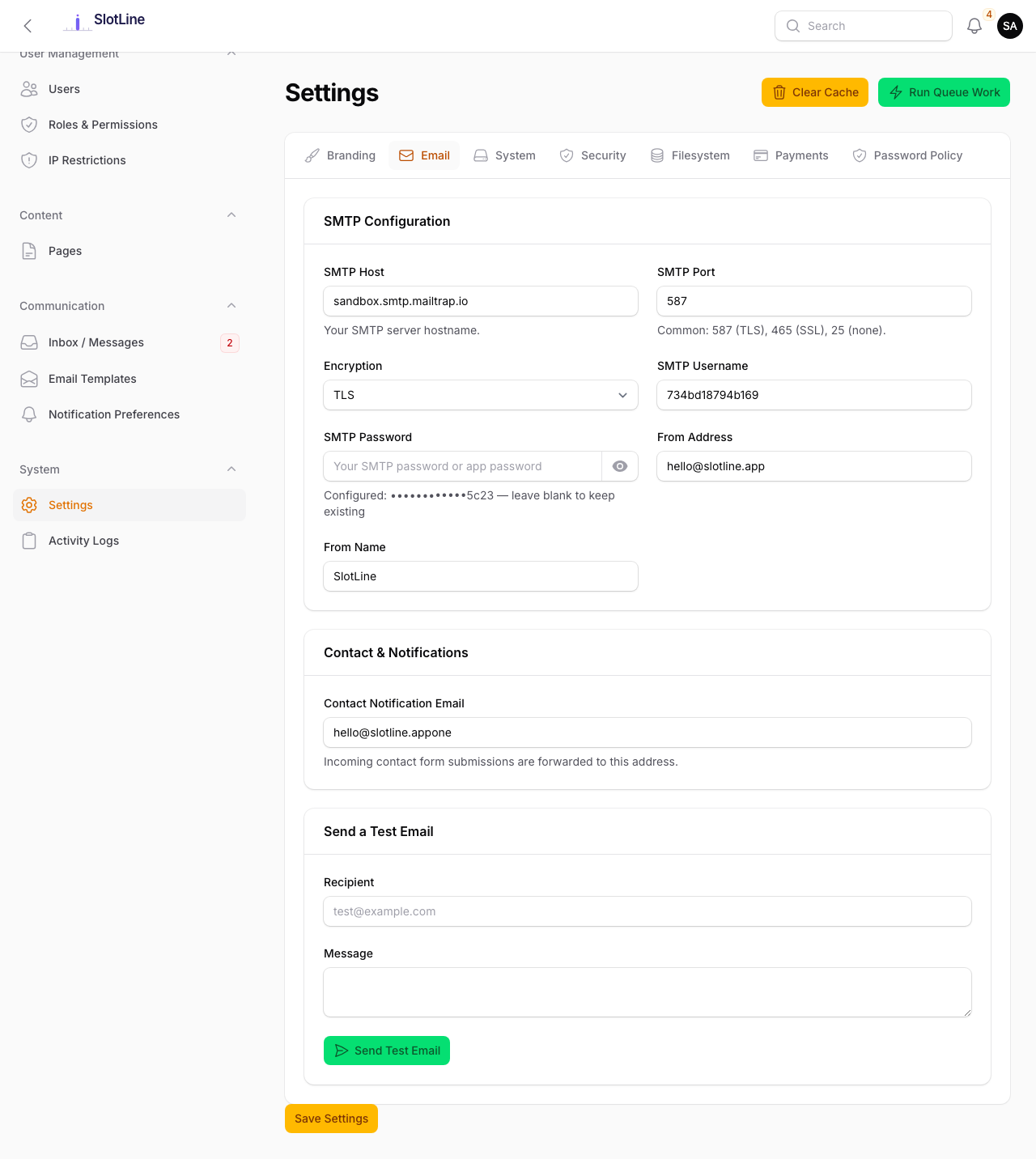
Use the Send Test Email button in Admin → Settings → Email to verify your SMTP configuration end-to-end. It sends a test message to the admin's email address.
# You can also test from the command line:
php artisan tinker

# Then:
Mail::raw('Test email from Slotara', function ($msg) {
    $msg->to('[email protected]')->subject('Test');
});
Check the mail queue for failed jobs:
php artisan queue:failedRetry a failed mail job:
php artisan queue:retry allIf emails are not arriving, first check your spam folder, then verify your SMTP credentials with the provider's dashboard, and finally check
storage/logs/laravel.logfor SMTP error messages.