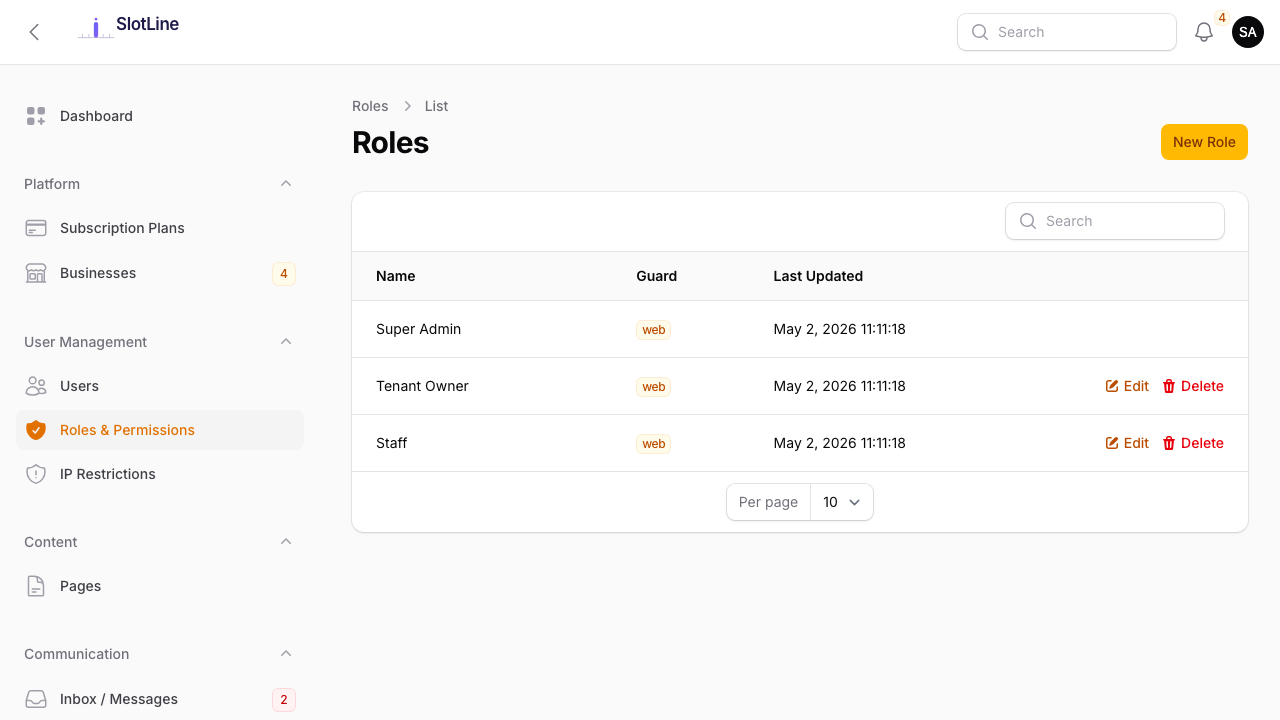
Roles & Permissions
Default Roles
Slotara ships with five built-in roles. Each role controls which panels a user can access and what actions they can take.
| Role | Panel | What They Can Do |
|---|---|---|
/admin |
Full platform control — bypasses all permission checks | |
/manage |
Manages their business: services, providers, staff, bookings, settings | |
/manage |
Bookable team member with their own schedule | |
/manage |
Read/manage bookings only — no services, providers, or settings access | |
| Public only | End customer who has booked a service |
{primary.fa-users} Users can hold multiple roles. A tenant owner who takes bookings can be both
tenant_ownerandprovidersimultaneously.
Editing Permissions
- Click Edit on any role
- Toggle individual permissions per resource
- Save — changes take effect immediately for all users with that role
Each resource has granular on/off toggles:
| Permission | What It Controls |
|---|---|
| View list | See the list of all records |
| View detail | Open and read a single record |
| Create | Add new records |
| Edit | Modify existing records |
| Delete | Delete a single record |
| Bulk delete | Delete multiple records at once |
{warning.fa-exclamation-triangle} Avoid removing permissions from
tenant_ownerunless intentional. Missing permissions can cause blank pages or errors in the Business Panel.
Super Admin Bypass
The super_admin role does not go through the permission check layer at all. Even if all permissions are accidentally removed from the role, super admins retain complete access to every panel and resource.
This is by design — it prevents accidental lockout of the platform owner.
{danger.fa-ban} Keep the number of
super_adminusers to a minimum. Every super admin can see all tenant data, impersonate any user, and modify billing. Assignstaffortenant_ownerroles to team members who only need partial access.
Notification Preferences
Each admin user controls which events they are notified about at Admin → Notification Preferences.
| Event | Triggered By |
|---|---|
new_registration |
A new user registers on the platform |
welcome_email |
Sent to the new user automatically on registration |
reset_password_confirmation |
A user completes a password reset |
contact_confirmation |
A visitor submits the contact form |
new_contact_enquiry |
Admin alert for a new contact form submission |
Toggle each event per channel (Email / In-App) independently.