Subscription Plans
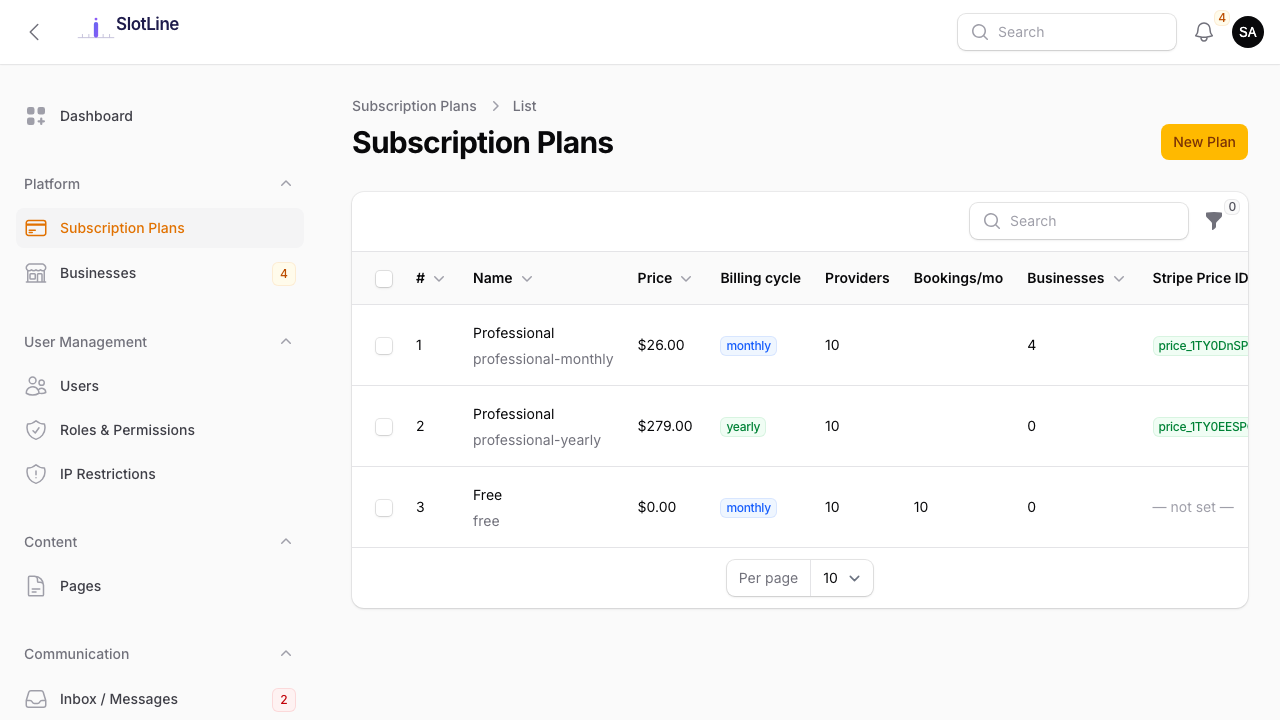
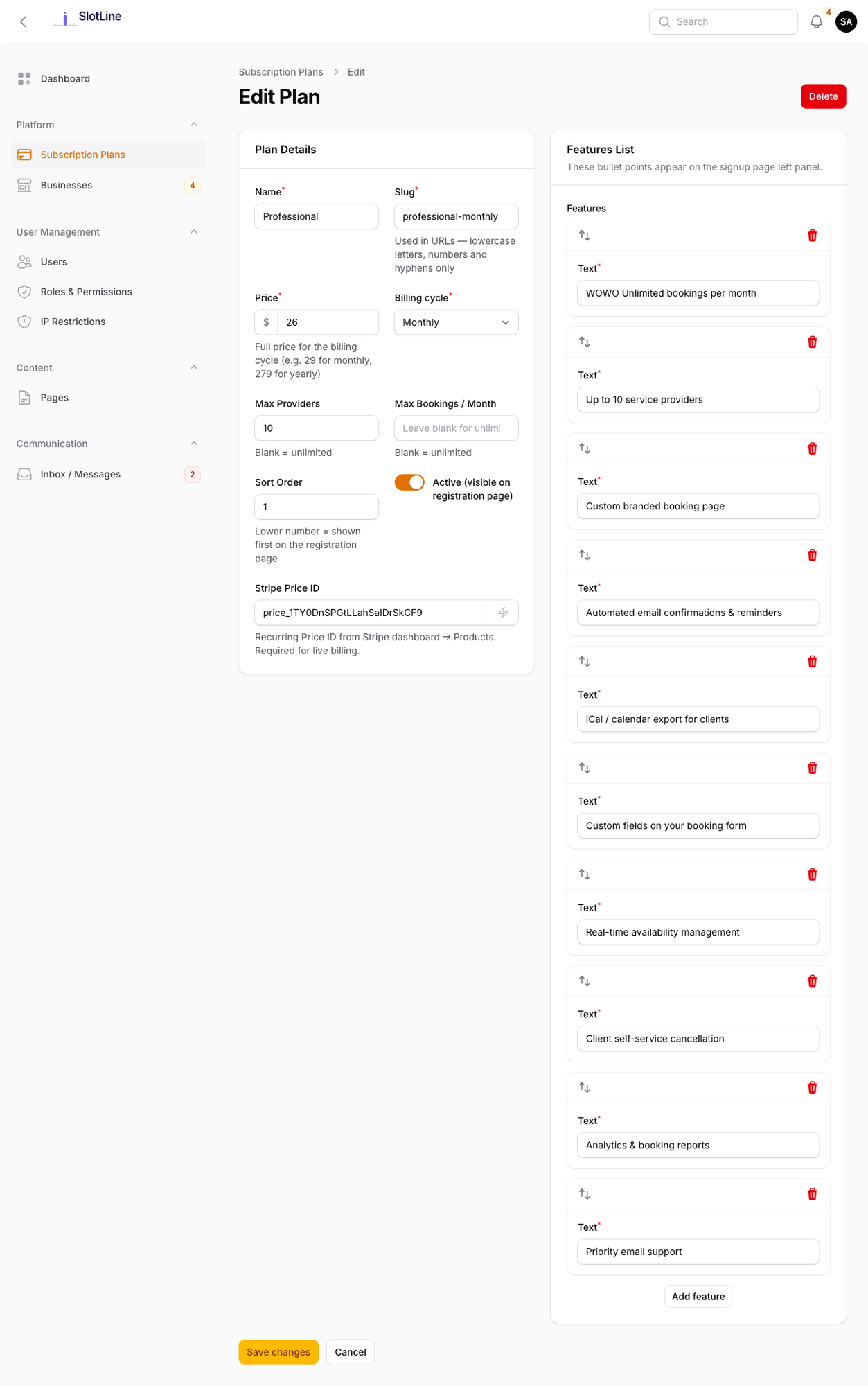
Plan Fields
| Field | Description |
|---|---|
| Name | Shown to registrants on the sign-up page (e.g. "Starter", "Pro", "Agency") |
| Price | Monthly price. Set to 0 for a free plan |
| Stripe Price ID | The price_... ID from Stripe Dashboard (required for paid plans) |
| Features | Bullet-point list displayed on the registration pricing page |
| Modules included | Add-on modules businesses on this plan can use (shown once a sellable add-on is installed). See Add-on Modules |
| Is Active | Only active plans are shown during registration |
| Sort Order | Drag to reorder plans on the registration page |
Creating a Free Plan
- Go to Admin → Subscription Plans → New Plan
- Enter a Name (e.g. "Free")
- Set Price to
0.00 - Leave Stripe Price ID empty
- Add any feature bullets you want shown (e.g. "Up to 3 services", "1 provider")
- Toggle Is Active on
- Save
Tenants on a free plan are provisioned immediately at registration — no payment step.
{primary.fa-lightbulb-o} A free plan lets businesses try Slotara before upgrading. You can convert a free-plan tenant to paid at any time from the tenant edit screen.
Creating a Paid Plan
Step 1 — Create the product in Stripe:
- Log in to Stripe Dashboard → Products
- Click + Add Product
- Enter a product name (e.g. "Slotara Pro")
- Add a recurring price: set the amount, currency, and billing interval (monthly/annual)
- Save the product
- Copy the Price ID — it starts with
price_
Step 2 — Create the plan in Slotara:
- Go to Admin → Subscription Plans → New Plan
- Enter the Name and Price (must match Stripe)
- Paste the Price ID into the Stripe Price ID field
- Add feature bullets
- Toggle Is Active on
- Save
Registration flow for paid plans:
User fills registration form
        ↓
Redirected to Stripe Checkout (secure payment page)
        ↓
Payment succeeds
        ↓
Business account created automatically
        ↓
Welcome email sent
{warning.fa-exclamation-triangle} Make sure your Stripe Webhook is configured and your Signing Secret is saved in Admin → Settings → Payments. Without it, the webhook won't be verified and tenants will not be provisioned after payment.
Changing a Tenant's Plan
To move a tenant from one plan to another:
- Go to Admin → Businesses
- Click Edit on the tenant
- Change the Subscription Plan dropdown
- Save
{primary.fa-info-circle} Changes made here take effect immediately and don't touch the business's Stripe or Paystack subscription — adjust billing in your gateway dashboard if needed. Businesses can also change plan themselves (below), which handles billing for you.
Plan Changes by the Business
Businesses can upgrade or downgrade from Manage → Subscription when the platform gateway is Stripe or Paystack:
- The plan picker shows every active plan with a monthly / yearly toggle and Upgrade, Downgrade or Current on each card.
- Choosing a plan opens a summary: the price difference, any proration, and when the change takes effect.
- A downgrade that would go over the new plan's limits (staff, services, etc.) is blocked with an explanation of what to remove first.
| Change | What happens |
|---|---|
| Upgrade or downgrade between paid plans (Stripe) | The subscription price is swapped with proration. If the payment fails or needs 3-D Secure, the plan stays as it was |
| Upgrade or downgrade between paid plans (Paystack) | A new subscription is started for the new plan and the old one is disabled |
| Move to a free plan | Scheduled for the end of the paid period. The business sees a banner with Keep current plan until then |
Scheduled changes are applied by the hourly billing:apply-scheduled-plans task, so the cron job must be running.